

DataCollection#
Use xdas.DataCollection when your experiment is composed of several acquisitions on a single or on multiple cables/fibers. In the following section, we will discuss how to use this functionality.
xdas.DataCollection is a dict-like container of xdas.DataArray.
It is mainly used to save several DataArrays in a single file. Unlike
xarray.Dataset, the different DataArrays do not need to
share coordinates. DataCollection can, for example, be useful to save a
list of Regions of Interest (ROIs).
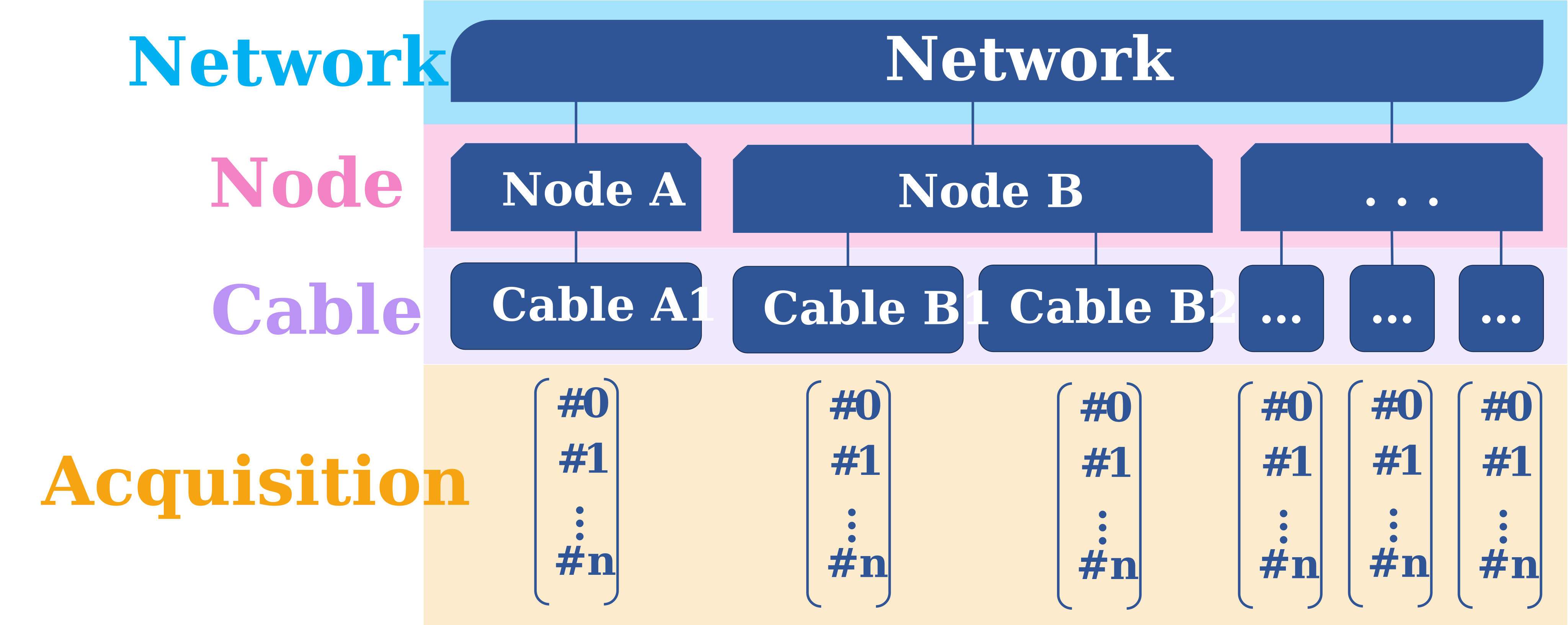
A xdas.DataCollection can be viewed as a flexible way of organizing data. It has different hierarchical levels corresponding to your file tree. In this example below, we can see different levels for one global experiment that included several cables, with several acquisitions:
1rst (mapping) level: can be the “Network” code, relative to the experience name.
2nd (mapping) level: contains the “Node” codes relative to the places where the fibers/cables are.
3rd (mapping) level: concerns the fibers/cables names.
4th (sequence) level: is related to the number of acquisitions with changing parameters.
Case A: DataCollection as a set of DataArrays#
In the example, our DataCollection will be a sequence of xdas.DataArray.
import numpy as np
import xdas as xd

# Reopen dataarray from previous section as a virtual source
da = xd.open("dataarray.nc")

# Create a DataCollection
dc = xd.DataCollection(
    {
        "event_1": da.sel(time=slice("2023-01-01T00:00:10", "2023-01-01T00:00:20")),
        "event_2": da.sel(time=slice("2023-01-01T00:00:40", "2023-01-01T00:00:50")),
    }
)
dc
Collection:
  event_1: <xdas.DataArray (time: 1001, distance: 1000)>
  event_2: <xdas.DataArray (time: 1001, distance: 1000)>
If the DataArrays are opened from files (having as data a
xdas.virtual.VirtualSource) then the data collection can be saved virtually
to minimize redundant data writing.
# Write the DataCollection
dc.to_netcdf("datacollection.nc", virtual=False)
# Read a DataCollection
dc = xd.open("datacollection.nc")
dc
Collection:
  event_1: <xdas.DataArray (time: 1001, distance: 1000)>
  event_2: <xdas.DataArray (time: 1001, distance: 1000)>
Case B: DataCollection comprising a set of acquisitions#
You can also create a DataCollection to gather different acquisitions on a same fiber with xdas.open()to opens a directory tree structure as a data collection.
The tree structure is described by a path descriptor provided as a string
containing placeholders. Two flavors of placeholder can be provided:
{field}: this level of the tree will behave as a dict. It will use the directory/file names as keys.[field]: this level of the tree will behave as a list. The directory/file names are not considered (as if the placeholder was replaced by a*) and files are gathered and combined as usual.
Several dict placeholders with different names can be provided. They must be followed by one or more list placeholders that must share a unique name. The resulting data collection will be a nesting of dicts down to the lower level which will be a list of dataarrays.
Gather all your DataCollections#
In this example, for the 19th of November 2023, our network REKA featured 2 cables (RK1 and RK2), with the RK1 cable having 3 different acquisitions and RK2 one acquisition.
If your data paths are something like: “/data/REKA/RK1/20231119/proc/.hdf5” and “/data/REKA/RK2/20231119/proc/.hdf5”, you can define your data path as “/data/{network}/{cable}/20231119/proc/[acquisition].hdf5”. You free to choose other words to define “network” and “cable”, you juste have to replace them.
path = "/data/{network}/{cable}/20231119/proc/[acquisition].hdf5"
dc = xd.open(path, engine='asn')
dc
Network:
  REKA:
    Cable:
        RK1:
        Acquisition:
            0: <xdas.DataArray (time: 54000, distance: 10000)>
            1: <xdas.DataArray (time: 10000, distance: 5000)>
            2: <xdas.DataArray (time: 9000, distance: 10000)>
        RK2:
        Acquisition:
            0: <xdas.DataArray (time: 54000, distance: 10000)>
# Write it as your global DataCollection in .nc with the virtual argument True
dc.to_netcdf("datacollection.nc", virtual=True)
# Read your global DataCollection with open_datacollection
dc = xd.open("datacollection.nc")
dc
Network:
  REKA:
    Cable:
        RK1:
        Acquisition:
            0: <xdas.DataArray (time: 54000, distance: 10000)>
            1: <xdas.DataArray (time: 10000, distance: 5000)>
            2: <xdas.DataArray (time: 9000, distance: 10000)>
        RK2:
        Acquisition:
            0: <xdas.DataArray (time: 54000, distance: 10000)>
If you have several DataCollections, you can gather them in one file using xdas.open() and write it to one single DataCollection.
Extend your DataCollection#
You can extend your xdas.DataCollection by inserting new xdas.DataArray to the acquisitons list.
# Read your global DataCollection with open_datacollection
dc = xd.open("datacollection.nc")

# Read the dataarray you want to add
da = xd.open("dataarray.nc")
da
<xdas.DataArray (time: 68577, distance: 50000)>
VirtualSource: 72.5TB (float32)
Coordinates:
  * time (time): 2021-10-27T15:44:10.722 to 2021-12-03T15:45:18.419
  * distance (distance): 0.000 to 204255.953
# Add the dataarray to the datacollection at the acquisition number 0
dc['REKA']['RK2'].insert(0, da)
dc
Network:
  REKA:
    Cable:
        RK1:
        Acquisition:
            0: <xdas.DataArray (time: 54000, distance: 10000)>
            1: <xdas.DataArray (time: 10000, distance: 5000)>
            2: <xdas.DataArray (time: 9000, distance: 10000)>
        RK2:
        Acquisition:
            0: <xdas.DataArray (time: 68577, distance: 50000)>
            1: <xdas.DataArray (time: 54000, distance: 10000)>
You now have 2 acquisitions in your acquisitions list.